Snohomish County Court serves residents by handling criminal, civil, family, and probate cases within the county. It is an essential part of the Snohomish County judicial system and works closely with Washington state courts. The court ensures cases are processed according to state law while providing support to the public for filings, hearings, and official documentation. It also helps maintain order in the county by resolving disputes efficiently and fairly.
The court provides access to public case filings, court schedules, and official records. From minor traffic violations to major civil disputes, its structured processes ensure legal matters are managed efficiently and fairly. Residents can interact with the court both in person and through online portals, making case information easier to track. The system also supports jury service, document requests, and timely notifications of hearings. Court staff are available to assist with procedural questions and provide guidance on local court processes.
How to Search Snohomish County Court Cases
Searching court records in Snohomish County starts with the official statewide case search system used by Washington courts. This online case search tool allows the public to look up civil, criminal, and family cases through a secure court database. Users can perform a party name search, case number search, or review docket details and hearing schedules from their computer or mobile device. The system provides electronic access to public case information and updates regularly to reflect recent filings. Before starting, it helps to gather accurate details such as the correct spelling of names or the full case number.
Open the Case Search Portal
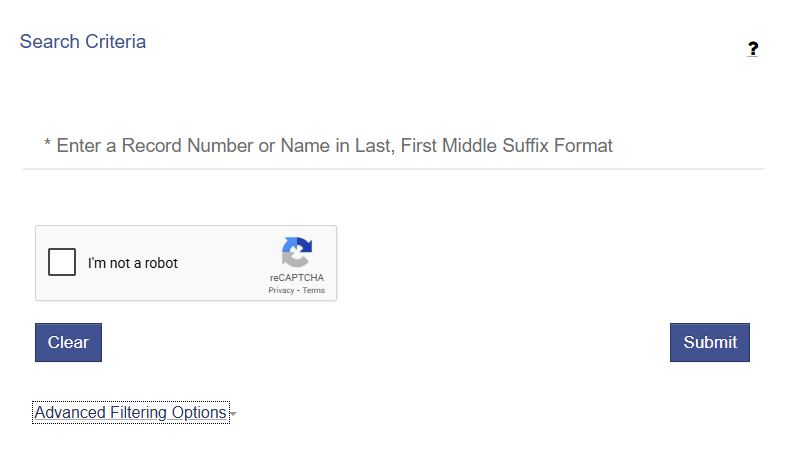
This is the official statewide case search system used by Snohomish County courts. You will see options to search by person name, case number, or other search filters.
Official site: https://odysseyportal.courts.wa.gov/odyportal in your browser.
Choose Your Search Method
Once you have opened the portal, users will see a clean interface with multiple search choices designed to make case lookup straightforward. The homepage provides clear fields for entering party names, case numbers, or docket references. Helpful prompts and instructions guide users on what information is required for each type of search.
Choose one of these common search options:
Party Name Search
- Select “Search by Name”.
- Enter the last name first, then the first name (middle name is optional).
- This finds cases where the person is a plaintiff, defendant, petitioner, or respondent.
- Good when you don’t know the case number.
Case Number Search
- Select “Search by Case Number”.
- Enter exactly the case number format your county uses (e.g., “20XX‑XXXXX”).
- This gives the most accurate and direct lookup.
- A single result will usually appear.
Hearing or Docket Search
Some portals allow filtering results to show recent docket entries or upcoming hearing dates.
- Choose filters like “Hearing Schedule” or “Next Court Date”.
- Dockets list case events in chronological order — new filings, orders, or scheduled hearings.
Review Search Results Carefully
Once results show up:
- Click on a case number link to see basic case info (status, parties, next dates).
- If documents are available, they may show as links or download options.
- Some case details may not display online (sealed or confidential records are trimmed).
Snohomish County Court Records
Snohomish County maintains a wide range of court records that are accessible to the public for research, legal purposes, or personal use. These records cover civil, criminal, probate, family, and traffic cases. Most documents are available electronically through the county portal, while some older or sensitive files may require formal requests. Public access ensures transparency in legal proceedings and allows users to obtain verified information about case status, filings, and outcomes.
What Snohomish County Court Records Include
The Snohomish County Court records system provides access to a variety of legal documents, including court documents, docket reports, and hearing transcripts. These records are useful for attorneys, researchers, and the public seeking detailed case information. Users can view case files electronically or request certified copies for official purposes. Some records are archived and may require a public records request for retrieval.
Common types of records include:
- Case files – detailed documentation of legal proceedings
- Hearing transcripts – written records of courtroom hearings
- Docket reports – chronological listing of case events
- Certified copies – official copies of court documents for legal use
- Public records requests – forms to request physical or electronic files
- Judicial archive access – historical case information maintained in the county archive
Civil Records
Civil court records cover disputes between individuals, businesses, or organizations. These documents include complaints, motions, court orders, and judgment entries. Most civil cases are public records, though some sensitive information may be partially redacted. Users can access summaries online or request certified copies for legal or official purposes.
- Complaint filings and answers
- Motions and court orders
- Judgment entries and settlements
- Case docket reports
Criminal Records
Criminal records document cases filed by the state against defendants for alleged violations of law. They include arrest information, charges, court proceedings, and sentencing details. While most criminal records are public, some, such as juvenile or sealed cases, have restricted access. These records help track the legal history of individuals and provide transparency for public oversight.
- Arrest information and charges
- Court proceedings and motions
- Sentencing orders and probation conditions
- Hearing transcripts and docket reports
Probate & Family Records
Probate and family court records handle matters like wills, estates, guardianships, adoptions, and custody cases. These records often include filings, inventories, court orders, and hearing transcripts. Some family-related documents may have restricted access to protect privacy, but many filings are available electronically. Users may request certified copies when official documentation is required.
- Guardianship and conservatorship filings
- Adoption and custody records
- Wills, estate inventories, and probate filings
- Hearing schedules and transcripts
Traffic Records
Traffic records document cases involving moving violations and other infractions managed by the Snohomish County courts. These records include citations, responses, court decisions, payment records, and docket summaries. Traffic records are generally public and available electronically, making it simple for drivers or attorneys to check case status or compliance.
- Citation filings and responses
- Court decisions or fines assessed
- Payment records and compliance status
- Docket summaries
Filing a Case in Snohomish County Court
Filing a case in Snohomish County Court requires knowing the proper filing process and gathering the necessary documents for submission. The court ensures that each filing is reviewed, processed, and assigned for hearings in an organized manner. Both in-person and electronic filing options are available to accommodate attorneys, individuals, and businesses. Being informed about these steps beforehand helps reduce delays and ensures a smooth experience with court administration.
Preparing to File a Case
Before initiating a legal filing, it is important to collect all required documents, such as complaints, petitions, or supporting evidence. Parties should also confirm payment of applicable filing fees, which vary by case type. Organizing materials beforehand reduces the likelihood of errors during clerk processing. Proper preparation ensures that the filing is complete, acceptable, and ready for submission.
- Gather all necessary forms and evidence relevant to the case.
- Verify applicable filing fees for the chosen case type.
- Ensure all documents are signed and dated properly.
- Prepare copies for personal records and court submission.
- Confirm any deadlines or special filing requirements.
Submission Methods
Snohomish County Court offers multiple submission methods for legal filings. Documents can be submitted in person at the Clerk’s Office, by mail following court guidelines, or electronically through the e-filing system. The e-filing system allows secure uploads, automatic fee calculations, and instant confirmation of submissions. Choosing the appropriate method depends on convenience, urgency, and the type of case being filed.
Submission options include:
- In-person filing at the Clerk’s Office for direct submission.
- Mail submission with properly completed forms and payment.
- E-filing system for online submissions and instant confirmations.
- Checking documents for compliance with formatting and filing rules.
- Keeping copies of all submitted materials for reference.
Clerk Processing and Case Assignment
After submission, court administration reviews the filing for accuracy and compliance with court standards. The Clerk’s Office assigns a case number and schedules hearings or case management conferences. Properly prepared filings help avoid processing delays and ensure that hearing assignments and notifications are issued promptly. Accurate submissions also make it easier to track the case status electronically or in person.
Steps in clerk processing include:
- Clerk reviews documents for completeness and proper signatures.
- Assignment of a case number and filing date.
- Scheduling initial hearings or case management meetings.
- Notifying involved parties about hearing dates.
- Recording documents in the court’s official docket system.
How to Request Copies of Court Records
Requesting copies of Snohomish County Court records is a straightforward process that ensures individuals and legal professionals can obtain verified documents. The process accommodates both certified and non-certified copies and provides multiple ways to submit requests. Understanding the records request process helps reduce delays and ensures accurate fulfillment of the requested documents. Most requests are handled efficiently through the Clerk’s Office, either online, by mail, or in person.
What is the Records Request Process
Before submitting a request, it is important to know the type of record needed and whether a certified copy is required. Certified copies are officially stamped and suitable for legal or official use. Standard copies can often be used for personal reference or research. Users should also be aware of copy fees and the expected processing time for their request. Proper preparation ensures the Clerk’s Office can process requests promptly.
Steps in the records request process include:
- Identify whether a certified or non-certified copy is needed.
- Gather case details such as case number, party names, or filing dates.
- Determine the applicable copy fees based on the document type.
- Review any special requirements for sensitive or sealed records.
- Plan for the estimated processing time before the record is needed.
Submitting Your Records Request
Snohomish County offers several methods for submitting a public records request. Individuals can request copies in person at the Clerk’s Office, via mail with payment included, or using the online request form for electronic submission. The online form streamlines the process, providing fields for case information, request type, and payment details. Submissions must also include identity verification to ensure records are released appropriately.
- In-person request at the Clerk’s Office for immediate guidance.
- Mail request with completed forms and payment.
- Online request form for electronic submission and confirmation.
- Attach proof of identity if requesting sensitive or certified records.
- Verify that all requested details match court records to avoid delays.
Receiving and Using the Copies
Once processed, copies are provided as either paper documents or electronically, depending on the request method. Certified copies carry an official stamp and signature, suitable for legal proceedings. Standard copies may be used for reference or research but are not legally certified. Processing times vary depending on the case type and volume of requests, so planning ahead is recommended.
- Confirm all fees are paid at the time of submission.
- Keep a copy of your request and payment confirmation.
- Check estimated processing times if documents are needed by a specific date.
- Contact the Clerk’s Office for updates or clarifications.
Court Calendar & Hearing Schedule Access
Accessing the court calendar in Snohomish County allows individuals, attorneys, and interested parties to stay informed about upcoming hearings and case events. The hearing schedule provides dates, times, and courtroom assignments for cases across civil, criminal, family, and traffic matters. Most information is available electronically, enabling users to check schedules conveniently and plan accordingly. Knowing the court calendar helps avoid missed appearances and ensures cases progress smoothly.
Viewing Case Dockets and Hearing Schedules
The case docket lists all scheduled events for a specific case, including motions, hearings, and trial dates. Each entry typically includes the appearance date, judge schedule, and courtroom assignment. Users can view dockets online via the public access portal, which is regularly updated to reflect changes. Remote hearings may also appear on the schedule, providing instructions for participation.
- Enter the case number or party name in the public access portal.
- Review the case docket for upcoming hearings and events.
- Note courtroom assignments and assigned judge information.
- Confirm appearance dates and times, including remote hearing instructions if applicable.
- Check back regularly for updates or changes to the schedule.
Optimizing Court Calendar Use
To make the most of the court calendar, users should plan carefully and monitor updates. Using the online portal ensures accurate information on hearing times and courtroom locations. Remote hearings may require checking connectivity or login instructions in advance. Double-checking the judge schedule and appearance dates reduces the risk of missed hearings. Staying organized and verifying information helps all parties comply with court procedures efficiently.
- Use the online calendar to plan travel or legal preparation.
- Confirm remote hearing links or instructions ahead of time.
- Verify judge schedules for any last-minute changes.
- Record hearing times and dates to avoid missed appearances.
- Contact the Clerk’s Office for discrepancies or questions about a hearing.
Departments Within Snohomish County Court
Snohomish County Court is organized into multiple judicial departments to manage different types of cases efficiently. Each department specializes in a particular area of law, allowing for focused case management and specialized expertise. Understanding the structure of court administration helps individuals, attorneys, and the public know which department to contact for their specific legal matter. Most departments also provide online resources and forms to assist with case filings, hearings, and inquiries.
Civil Division
The civil division handles disputes between individuals, organizations, or businesses. This includes contract disputes, property claims, personal injury cases, and other non-criminal matters. The division manages all filings, schedules hearings, and issues judgments or settlements. Parties may access case information, court forms, and filing instructions through the civil division portal.
- Reviewing civil complaints and petitions.
- Scheduling hearings and trials.
- Issuing judgments, orders, and settlements.
- Managing dockets and case records for public access.
Criminal Division
The criminal division oversees cases involving alleged violations of law, from misdemeanors to felonies. Prosecutors, defense attorneys, and law enforcement work with this division to schedule hearings, arraignments, and trials. The criminal division maintains detailed case files, including motions, court orders, and sentencing information.
- Handling arrests, charges, and filings.
- Scheduling hearings and trial dates.
- Processing judgments and sentences.
- Maintaining criminal case records for public or authorized access.
Family Law Division
The family law division manages cases related to domestic relations, including divorce, child custody, adoption, and guardianships. Sensitive information is protected, and access is often limited to involved parties. This division helps ensure that cases are scheduled appropriately and that all necessary filings are processed efficiently.
- Reviewing petitions for custody, support, and adoption.
- Scheduling family law hearings and mediations.
- Issuing court orders for custody, visitation, or support.
- Maintaining records in compliance with privacy regulations.
Probate and Juvenile Courts
The probate court handles wills, estates, conservatorships, and guardianships. Meanwhile, the juvenile court manages cases involving minors, including delinquency, dependency, and status offenses. Both courts ensure proper documentation, scheduling, and compliance with legal requirements for sensitive cases.
- Probate: managing estates, conservatorships, and filings.
- Juvenile: reviewing delinquency cases, dependency matters, and rehabilitation programs.
- Scheduling hearings and issuing orders.
- Maintaining records with restricted access for sensitive cases.
Small Claims Court
The small claims court provides a simplified process for resolving disputes involving limited monetary amounts. This court focuses on accessibility and efficiency, allowing individuals to represent themselves without an attorney. Small claims filings are handled quickly, with clear instructions for hearings and judgments.
- Reviewing small claims filings.
- Scheduling hearings and trials.
- Issuing judgments or payment orders.
- Providing accessible instructions and forms for self-represented litigants.
Public Access Rules & Privacy
Snohomish County provides public access to most court records while balancing privacy and legal restrictions. Court records include case filings, dockets, and judgments that are generally available to the public. However, certain documents are protected to ensure identity protection and compliance with legal requirements. Understanding these rules helps users access records appropriately without violating court restrictions.
Access Limitations and Confidential Records
Not all court documents are open for public viewing. Some records are sealed, contain confidential filings, or include sensitive personal information. In these cases, access may be limited to parties involved, their attorneys, or authorized representatives. The court may also provide redacted documents that remove personal identifiers while keeping essential case information visible.
- Sealed records cannot be accessed without a court order.
- Redacted documents hide sensitive information while providing necessary case details.
- Confidential filings may include juvenile cases, adoption, or protective orders.
- Users must comply with court restrictions when requesting copies.
- Identity protection is enforced to prevent unauthorized disclosure of personal data.
Procedure for Public Access
To use public access responsibly, users should verify whether the case or document is restricted. Requests for sensitive documents may require written permission or proof of involvement in the case. The Clerk’s Office can provide guidance on which records are accessible and how to obtain them. Public access rules aim to maintain transparency in the judicial process while safeguarding the privacy of individuals involved.
- Check if the record is sealed or confidential before requesting.
- Use official portals for accessing redacted documents.
- Avoid sharing sensitive information obtained from court records.
- Follow Clerk’s Office instructions for restricted case access.
- Respect all court restrictions and privacy guidelines.
Location & Contact Details
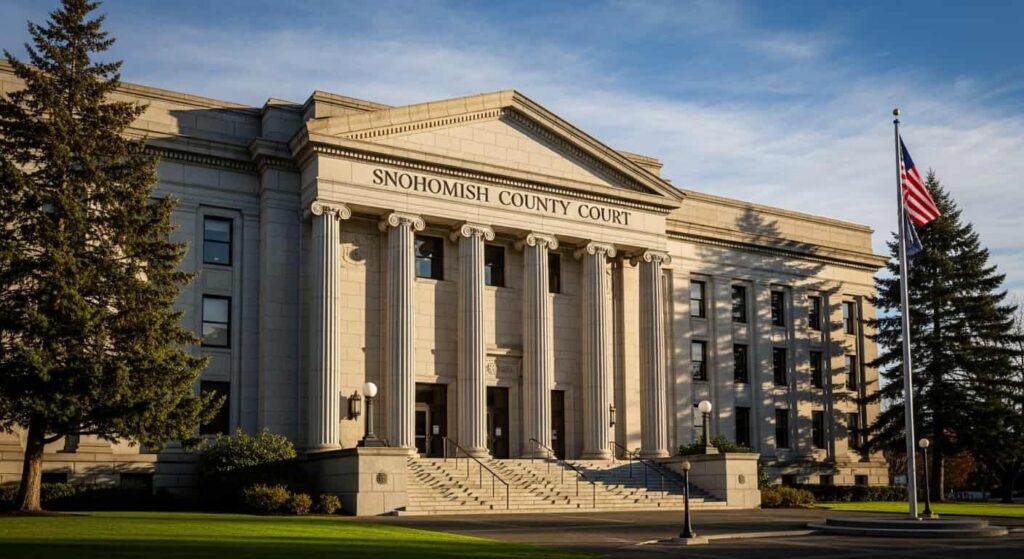
Anyone seeking Snohomish County courthouse information can find details about the courthouse location, court hours, and Clerk’s Office contact below. The courthouse serves as the main government building for Superior Court matters, record requests, filings, and public services in the county. The primary courthouse for Superior Court matters is located in Everett, Washington. Visitors should review courthouse hours and security requirements before arriving. The building houses courtrooms, the Clerk’s Office, and public service counters for records and filings.
Courthouse Location
The main courthouse location for Superior Court is:
Snohomish County Superior Court
3000 Rockefeller Avenue
Everett, WA 98201
This government building is centrally located in downtown Everett and is accessible by public transportation and nearby parking facilities. Visitors entering the courthouse must pass through security screening, similar to airport-style metal detectors. Prohibited items are not allowed inside, and valid identification may be required for certain services.
- Physical address: 3000 Rockefeller Ave, Everett, WA 98201
- Public entrance with security screening checkpoint
- Courtrooms and Clerk’s Office located inside the main building
- Accessible entrances and facilities available
Court Hours
The public counter for the Clerk’s Office usually operates during regular business hours, allowing visitors to file documents, request certified copies, and obtain general case information. It is recommended to arrive early for in-person filings or record requests, especially on high-traffic days, as wait times may increase during mornings and before scheduled hearings.
Standard court hours for the courthouse are typically:
- Monday through Friday
- 8:30 AM to 4:30 PM
- Closed on weekends and recognized holidays
Clerk Office Contact
Before mailing documents, confirm filing requirements and payment instructions to ensure compliance with current court procedures. Including accurate case details—such as the full case number, party names, and filing type helps reduce processing delays and prevents returned submissions. For case filings, records requests, or general inquiries, contact the Clerk’s Office directly to verify accepted payment methods, document formatting standards, and public counter hours.
The clerk office contact information is as follows:
- Phone: (425) 388-3466
- Mailing address: 3000 Rockefeller Avenue, M/S 605, Everett, WA 98201
- Services available: case filings, certified copies, docket inquiries, public records requests
Frequently Asked Questions
This section answers the most common questions about Snohomish County courts, case searches, records access, and filing procedures. Each answer provides clear and practical information to help users complete tasks such as searching cases, requesting certified copies, or confirming court dates.
How do I search Snohomish County court cases?
To search Snohomish County court cases, visit the official Washington Courts online case search portal. Users can perform a party name search or enter a case number for direct results. The system displays case summaries, docket entries, and upcoming hearing dates. Filters help narrow results by case type, filing date, or status. For best results, enter the exact spelling of names or the complete case number. The portal updates regularly to reflect new filings and court actions. This method allows fast electronic review without visiting the courthouse.
Are Snohomish County court records public?
Most Snohomish County court records are available through public access systems. Civil, criminal, traffic, and many probate records can be reviewed online or requested from the Clerk’s Office. Some documents are restricted due to court records privacy rules. Sealed records, confidential filings, and certain juvenile matters are not publicly viewable. In some cases, redacted documents are released to protect sensitive information. Identity protection rules limit access to private data. Users should confirm record status before submitting a request.
How can I request certified copies of court records?
Certified copies can be obtained through the Clerk’s Office using the official records request process. Requests may be submitted in person, by mail, or through an online request form if available. A certified copy includes a stamp and signature verifying authenticity for legal use. Applicants must provide accurate case details such as case number and party names. Applicable copy fees must be paid at the time of request. Processing time depends on record type and volume of requests. Certified documents are typically issued once verification is complete.
Where is the Snohomish County courthouse located?
The main Snohomish County courthouse is located at 3000 Rockefeller Avenue in Everett, Washington. This government building houses Superior Court courtrooms and the Clerk’s Office public counter. Standard court hours are Monday through Friday during regular business hours. Visitors must pass through security screening before entering the building. Parking and public transportation options are available nearby. The courthouse also handles record requests, filings, and scheduled hearings. Contact the Clerk’s Office for updated hours or service information.
Can I file legal documents online in Snohomish County?
Many case types allow electronic submission through the county’s e-filing system. This system supports secure uploads of legal filings and online payment of filing fees. Users receive confirmation once the submission is accepted by court administration. Some documents may still require in-person filing depending on case category. Required documents must meet formatting and signature standards before submission. Clerk processing assigns a case number and schedules hearings after approval. Checking filing requirements before submission helps prevent delays.